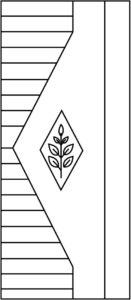
 01
Sale
Verdant Chevron Luxe
Interlocking chevron bands woven across the panel for a textured finish.
₹999.00₹299.00
Add to Cart
Geminexa designs machine‑tested wooden door grooving files. Preview every design as a real 40 mm door — groove pattern, router bit, depth, toolpath and a live CNC cutting simulation — then add it to your cart and download the DXF, DWG and CDR instantly.
Pick any design below to load it here. The 3D door sits on top and the live CNC machine below cuts it along the toolpath. Use the commands on the right to change the router bit, groove depth and width, then start or pause the machine.
Drag to rotate · Ctrl + scroll or pinch to zoom · tick “Show toolpath” to see the toolpath on the door (gold = cut, blue = rapid moves, green = already machined by the live machine below).
Every part of the machine can be rotated and zoomed: drag to rotate, Ctrl + scroll or pinch to zoom, or use the buttons.
Every design is shown as a real 3D CNC door. Tap a door to open it in the studio, or add it straight to your cart. Each pack includes the DXF groove file, a DWG working copy and a CDR layered source.
01
Sale
Interlocking chevron bands woven across the panel for a textured finish.
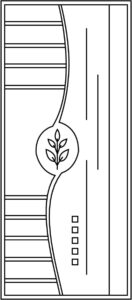 02
Sale
Heavy nested frames with a diamond centre, made for grand entrances.
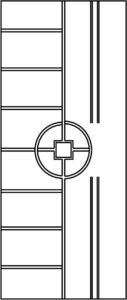 03
Sale
Heavy nested frames with a diamond centre, made for grand entrances.
CNC door grooving is the process of routing decorative channels, panels and reliefs into a wooden door face using a computer‑controlled router. Every Geminexa file is drawn as a true vector groove path — not a traced image — so your machine follows exact depth, width and corner geometry without manual cleanup.
Every groove is a single closed polyline — no overlaps, no open nodes — so the toolpath compiles without gaps.
Outline, panel-relief and detail grooves sit on separate layers, labelled with the recommended router bit and cut depth.
Files are drawn to real door dimensions in mm and inches, so scaling for 32", 36" or custom slabs stays proportional.
Groove direction is planned around common grain orientation, so the finished routing highlights rather than fights the wood.
We test every file on an actual CNC router before it's listed, so what you see on screen is exactly what gets cut on the slab.
Every groove pattern is simulated and test‑cut so toolpaths run clean with no missed nodes or double cuts.
Files unlock immediately after payment confirmation — download links are also emailed for backup access.
DXF for router software, DWG for AutoCAD edits, and CDR for CorelDRAW previews — one purchase, every format.
A single purchase covers unlimited cuts for your own workshop's client orders — see our license terms below.
When we refine a groove pattern or add a new size variant, every past buyer gets the updated file at no cost.
Stuck on bit selection or feed rate? Message our team on WhatsApp and get a reply from a working carpenter.
Because the sequence matters — each step depends on the one before it.
Filter designs by door type, groove depth or style and open the full preview sheet.
Add designs to your cart, check out securely with WooCommerce, and get an instant download link plus receipt.
Your DXF, DWG and CDR pack unlocks immediately and is also sent to your email as backup.
Import into your CNC software, set the recommended bit and depth, and cut your groove design.
"The groove depth was exactly as labelled — first cut came out clean, no re-routing needed on the panel edges."
"Having DXF and CDR both in one pack saved us hours — we quote the CDR preview to clients before cutting."
"Support helped us pick the right bit for the sunburst design over WhatsApp within minutes. Genuinely useful team."
DXF and DWG files open in any standard CNC router software including Type3, ArtCAM, RDWorks, VCarve, and AutoCAD-based controllers. The CDR file opens in CorelDRAW for preview and quoting.
Yes. Every file is drawn as true vector geometry, so it scales proportionally to your slab size without distorting groove width or corner detail.
The download unlocks instantly on the confirmation page, and a backup download link is emailed to the address used at checkout.
Yes, our workshop license covers unlimited physical cuts of the design for your own client work. Reselling or redistributing the digital file itself is not permitted — see our Refund & License Policy below.
Message our support team with your machine model and bit size — most issues come down to feed rate or bit diameter, and we'll help you adjust the settings directly.

Geminexa started inside a working CNC workshop, where design files that looked perfect on screen kept failing on the machine — wrong depths, open paths, unrealistic groove widths. We began redrawing our own patterns to fix that, and the design pack we built for ourselves became the library we now sell.
Today our small team of designers and machine operators produces every wooden door groove pattern in-house, test-cuts it on real MDF and teak samples, and only lists it once it machines cleanly. That workshop-first approach is still how every new design gets made.
Tell us your door size, style and bit specification — we'll get back with a design or a quote.
Reach us directly for custom CNC groove design requests, bulk licensing or file support.
By purchasing or downloading a file from Geminexa, you agree to use the design for producing physical wooden door products, either for yourself or for your own paying clients.
Orders are confirmed once payment is verified by our payment partner. You're responsible for keeping your download link and receipt email safe.
We collect the name, email, phone number and address details you provide at checkout or through the contact form, purely to deliver files and respond to enquiries.
Payments are processed entirely by our third-party payment gateway partner. Geminexa does not store your card, UPI or bank details on its own servers.
You can request a copy or deletion of your contact data at any time by writing to geminexa18@gmail.com.
Because DXF/DWG/CDR files are delivered instantly and can be downloaded immediately, all sales are final once the file has been accessed.
One purchase grants a single workshop an unlimited-cut license for physical production. It does not grant rights to resell, license or share the underlying digital file.
Pick a groove design from the library, or tell us your custom pattern and we'll draw it for your machine.